
Barracks
The Barracks is the screen where you look after your heroes: you build the team, see each hero's sheet and manage skills, equipment, dyes, jewels, Bond, Awakening and appearance. Open it with the Barracks button at the top of the screen. This page explains the hero list (search, filters and order), Train and player reviews.
Hero list, filters and order
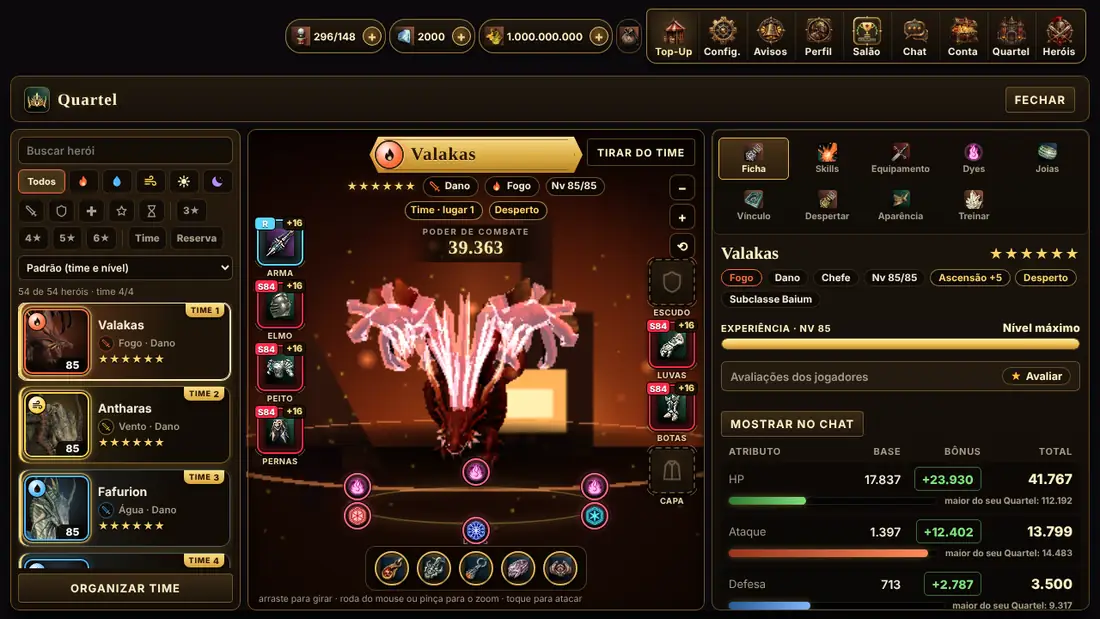
The list is on the left; on phones it becomes a carousel. Each card shows the portrait, element, role, stars and level. Heroes in the main team carry the TEAM mark and their slot number (1 to 4). Above the list, a counter shows how many heroes appear and the team size, as in "54 of 54 heroes · team 4/4".
Search and filters
| Filter | How it works |
|---|---|
| Search hero | Searches by name, by the description under the name (such as "Archer · Human") or by element. |
| Element | All, Fire, Water, Wind, Light or Darkness. |
| Role | Damage, Tank, Healing, Support or Control. Tap the same button again to turn it off. |
| Stars | 3★, 4★, 5★ or 6★. Tap the same button again to turn it off. |
| Team and Reserve | Team shows only the heroes in the main team; Reserve, only those outside it. |
| Filters button | On phones, the filter options are behind the Filters button. |
Filters combine: the hero must pass all of them. If none passes, the list shows "No hero with these filters."
List order
The Default (team, level) option comes selected: the 4 heroes of the main team come first, in team order (slots 1 to 4); then come the others, from highest level to lowest, and when levels tie, in alphabetical order (A–Z). You can change the order in the selector above the list:
| Option | Order |
|---|---|
| Default (team, level) | Main team first; then highest level; ties in alphabetical order. |
| Most stars | From the most stars to the fewest; ties by highest level. |
| Highest level | From highest level to lowest; ties by stars. |
| Element | Fire, Water, Wind, Light and Darkness, in that order; within each element, more stars and higher level first. |
| Name (A–Z) | Alphabetical order; ties by highest level. |
| Team first | Main team at the top, in team order; then more stars and higher level. |
The Heroes screen
The Heroes button, at the top of the screen and in the bottom bar, opens the other hero screen, with the tabs Equipment, Jewels, Dyes, Skills, Bond, Duplicates, Status, Profession and Appearance. Heroes appear as tabs at the top, in the same default order: first the 4 of the main team, in team order; then the others by highest level and, on a tie, in alphabetical order.
Train: the Training Ritual
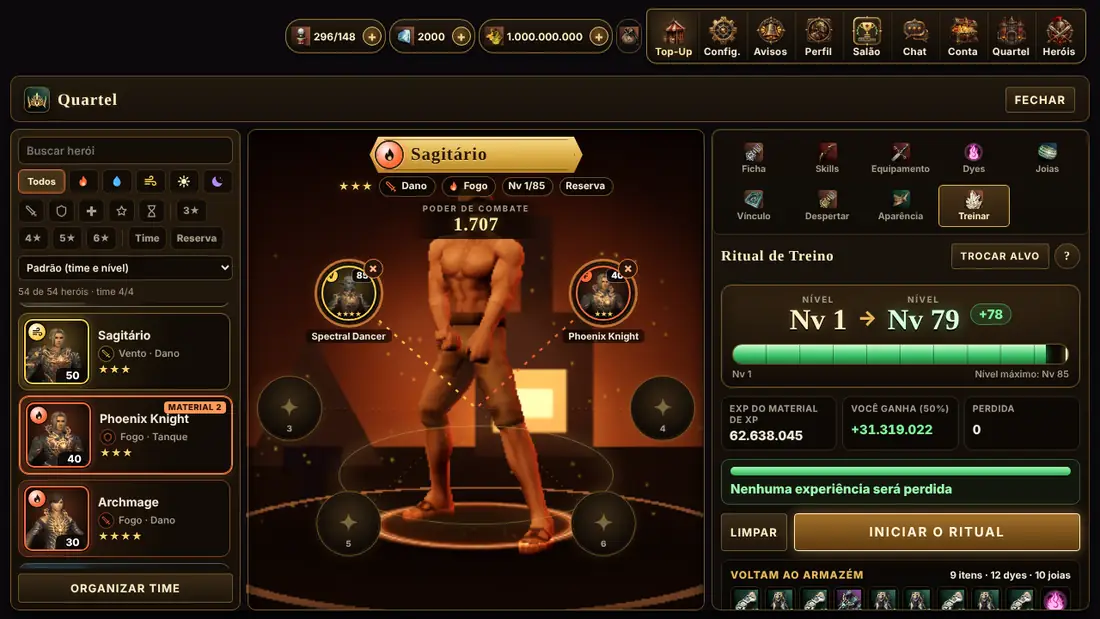
Train turns heroes you no longer use into experience for another hero. It is in the Barracks (Barracks › hero › Train). The open hero is the target, which receives the experience; the heroes you offer to the ritual are the XP material and are consumed. The ritual costs nothing.
How to use it
- In the Barracks, choose the hero who will receive the experience and open the Train tab. To switch target, tap Change target and then the other hero in the list.
- In the list, tap the heroes who will be the XP material: 1 to 6 per ritual. They get the mark MATERIAL 1, MATERIAL 2 and so on, and fill the slots around the target, which gets the mark RECEIVES. To take a hero out of the ritual, tap them again. The Clear button empties the slots.
- The preview shows the target's new level, the experience it gains and the experience that would be lost, and what returns to the Warehouse.
- Tap Start the ritual and confirm in the Confirm the ritual window. If there is a rare hero among the XP material, a second confirmation follows (see below).
Train only works while connected to your account and outside battle: finish or give up the open battle before using the ritual.
How the experience is calculated
The target receives 50% of the total experience of all the XP material, added together. A hero's total experience is all the XP of the levels they have already passed plus the XP they have within the current level; it is not 50% of the level. The sum of all the heroes is made first and only then the 50% is taken, rounding down. Since the XP each level requires grows a lot, a high-level hero is worth much more than several low-level ones. Examples, with no XP within the current level:
| XP material hero | Total experience | Passes to the target (50%) |
|---|---|---|
| Level 20 | 7,133 | 3,566 |
| Level 40 | 169,011 | 84,505 |
| Level 60 | 2,699,996 | 1,349,998 |
| Level 75 | 18,338,792 | 9,169,396 |
| Level 85 | 62,467,800 | 31,233,900 |
Level limit and loss
The target rises up to the profession level limit: Lv 19, 39, 75 or 85. Experience beyond the limit is lost. The ritual shows, before you confirm, how much will be lost, in EXP and in percent. A target that is already at the limit cannot train: when the limit is 19, 39 or 75, the screen offers Go to Awakening, to change profession and unlock more levels (see Hero progression); at Lv 85 there is nothing left to gain.
What returns to the Warehouse
The equipment, dyes and jewels the XP material was using return free to the Warehouse, with nothing lost. The Return to the Warehouse panel shows the amount before you confirm.
What is lost forever
The XP material heroes disappear, along with their skills, Ascension, Awakening, profession and Bond. It cannot be undone. Unlike the Hero Registry, Train does not record the hero in the Collection.
Who cannot be XP material
In the list, a hero who cannot be offered carries a tag with the reason, and tapping them shows the explanation. Take the hero out of that situation and try again.
| Tag | Situation |
|---|---|
| RECEIVES | It is the ritual's own target. |
| In team | In the main team. |
| Saved team | In a saved team, including the content teams (lair, dungeon, raid...). |
| Defense | In the Olympiad defense team. |
| Favorite | In the favorite team on the Profile. |
| Locked | Has the lock on. |
| Champion | Is the Olympiad Champion (Class Hero). |
| In battle | A battle is open: no hero can be offered until it ends. |
Confirmations
The ritual always asks for the Confirm the ritual confirmation, which shows the heroes, the new level, the loss and what returns to the Warehouse. If any XP material hero is ★5 or ★6, Awakened, has Ascension or has a subclass (Bond), the Warning: rare hero window also appears, listing them, and it only counts after Yes, consume.
Player reviews
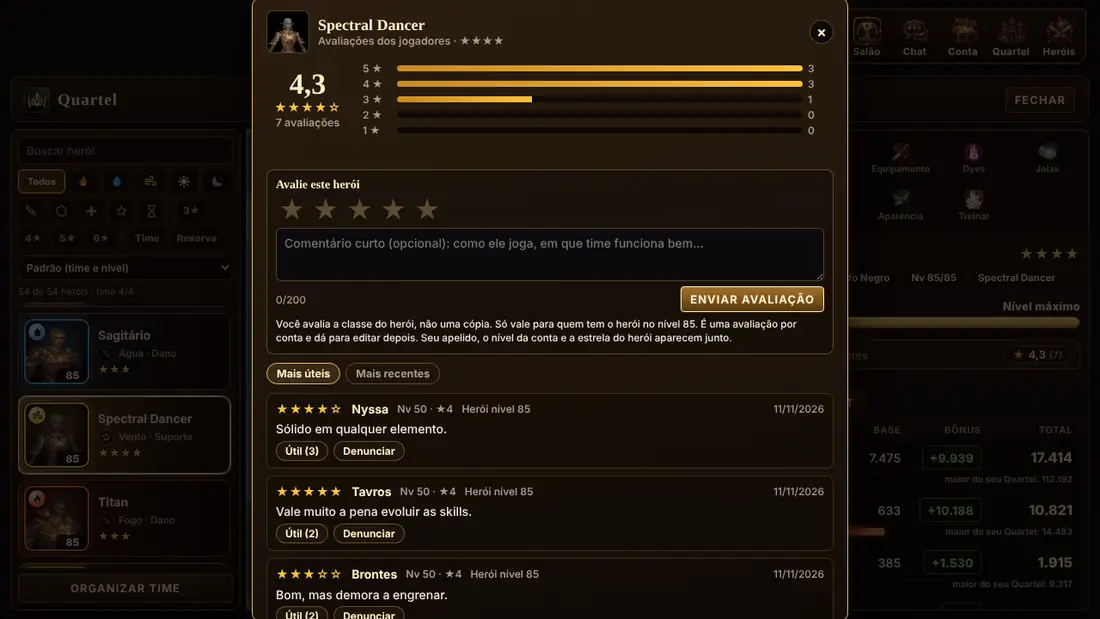
Each hero has an average rating and comments from players who have them at level 85. The review applies to the hero class, not to one copy or to a specific element.
Where it appears
- Barracks › Sheet: the Player reviews strip, under the hero's tags, with the average rating and the number of reviews (for example, "★ 4.3 (7)"). With no reviews at all, the button says ★ Rate. Tap it to open the hero's window.
- Hero Collection: in a class's detail, next to the Open in Registry button.
- Profile › Summary: the My hero reviews box, with everything you have already rated.
How to rate
- Have the hero at level 85 in the Barracks (any element). Without that, the window shows "To review, you need to have this hero at level 85."
- Open the hero's reviews and choose 1 to 5 stars.
- If you want, write a short comment, from 3 to 200 characters. It is optional: a rating alone also counts.
- Tap Submit review.
It is one review per account and per class, and you can change it later (Edit mine and Save changes). Your nickname, your account level and the hero's star rating appear next to the review; with no nickname, "Anonymous player" appears. Team (staff) accounts do not rate or vote.
Comment rules
- No profanity, links, contacts or phone numbers.
- No repeating the same character many times or writing everything in capitals.
- At most 20 reviews per day and 6 every 10 minutes, with a short interval between submissions.
- Players who are muted in chat cannot write reviews.
Average, list and order
The average (with one decimal place) and the bars from 5 to 1 stars count all visible reviews, with or without a comment. The list shows the comments, 10 at a time (See more button), and your own review even without a comment. There are two orders: Most helpful, the one selected by default (on a tie, the most recent first), and Most recent.
Helpful, reports and moderation
- Helpful: tap Helpful on another player's comment. It is one vote per account on each comment, and tapping again removes the vote. It does not work on your own comment and there is a limit of 30 votes every 10 minutes. If the author changes the text, the comment starts over with no votes.
- Report: choose the reason (Offensive, Spam, Misleading or Other). It is one report per account on each comment, at most 10 per day, and you cannot report your own comment.
- Moderation: the team reviews reports and can hide or restore comments. With 5 reports, the comment is hidden until the team decides (if the team has already restored it before, new reports do not hide it on their own). A hidden comment does not appear to other players or count toward the average; only the author, with a notice, and the team can see it.